
Why Random Video Chat Still Fascinates People
There is something oddly compelling about clicking a button and, within a couple of seconds, staring at the face of a total stranger somewhere else on the planet. No profile to read first, no mutual friends, no algorithm quietly deciding you'd get along based on your shopping history. Just two cameras and a coin flip. That simple mechanic - instant, random, one-on-one video connection - is the entire premise of random video chat, and it has managed to survive more than a decade of changing internet fashions.
If you've never used one of these platforms before, the idea can feel a little intimidating. Who are you actually going to meet? Is it safe? What do you even say to someone you have zero context for? This guide walks through all of it: where the format came from, what to expect the first time you log on, the setup that makes for a smoother experience, mistakes almost everyone makes early on, and how to tell a well-built platform from a sketchy one.
A Quick History: From Chatroulette to Omegle's Shutdown
Random video chat as a category traces back to 2009, when a Russian teenager named Andrey Ternovskiy built Chatroulette in his bedroom. The concept was almost aggressively simple - pair two random webcam users, let them talk, and give both sides a "Next" button to bail out whenever they wanted. It spread fast, got a burst of mainstream media coverage, and just as quickly became notorious for the amount of unmoderated content users ran into.
Not long after, Omegle launched with a similar pitch, minus the webcam requirement at first - text chat with strangers, later expanded to video. Omegle's tagline, "Talk to strangers!", became shorthand for the entire genre over the following decade. It reached enormous scale, got referenced in countless memes and YouTube videos, and for many people under 30, it was their first real exposure to talking with someone from a completely different country in real time.
Omegle shut down in November 2023. Its founder cited the operational and legal burden of moderating anonymous video traffic at scale, along with growing scrutiny over how the platform was used by minors. It was a significant moment for the category - a reminder that "random people, no accounts, live video" is a genuinely hard thing to run responsibly, and that the platforms which survive long-term are the ones that treat safety as core infrastructure rather than an afterthought. If you want the fuller backstory, we've covered it in more detail on our page about what happened to Omegle.
The shutdown didn't kill the format - it just reshuffled who's offering it. A newer wave of platforms, Aznabee included, picked up the same core idea but built it on more modern foundations: better moderation tooling, no forced downloads, and browser-native video instead of clunky plugins.
What a First Session Actually Looks Like
If you've never tried this kind of platform, the flow is more predictable than you'd expect. Here's roughly what happens, step by step.
1. The browser asks for permission. The moment you open a random video chat site, your browser will pop up a prompt asking whether the page can access your camera and microphone. This is standard and expected - it's your browser protecting you, not the website spying on you. You can decline and still browse the site, but obviously you won't be able to video chat until you allow access.
2. You join a matching queue. Once permissions are granted, you're placed into a short waiting period while the platform looks for someone else who's also online and available. This usually takes a few seconds to under a minute depending on how many people are active at that moment. Some platforms show you your own camera preview during this wait so you can check your lighting and framing before you're actually connected to anyone.
3. You get paired. When a match is found, both sides' video streams connect directly, typically using a browser technology called WebRTC (more on that below). You'll suddenly see another person's live camera feed, and they'll see yours. There's usually a brief "hello, where are you from" phase - completely normal, since neither of you has any other context to go on.
4. You use the skip button whenever you want. This is the feature that makes the whole format work. If the conversation isn't clicking, if the connection is choppy, or if you simply want to talk to someone else, you click "Next" (or "Skip") and you're dropped back into the queue for a new match. No explanation owed, no awkward goodbye required. Skipping is the norm, not an insult.
That's genuinely the whole loop. Everything else - filters, interest tags, text chat alongside video, reporting tools - sits on top of that basic four-step cycle.
Getting Your Setup Right
You don't need expensive gear, but a few basics make a real difference in how enjoyable your sessions are.
- A working webcam with decent lighting. Built-in laptop cameras are fine. The bigger factor is usually lighting - face a window or a lamp rather than sitting with a bright light source behind you, which turns you into a silhouette.
- A stable internet connection. Video calls need consistent bandwidth more than they need blazing-fast peak speeds. A shaky Wi-Fi signal will cause more frozen frames and dropped connections than almost anything else.
- A modern, updated browser. Chrome, Firefox, Edge, and Safari all support the WebRTC standard that powers real-time video without plugins. Keeping your browser updated avoids compatibility hiccups. If you're curious about the actual technology handling the video and audio streaming under the hood, our explainer on how WebRTC works breaks it down without getting overly technical.
- Headphones, if you're in a noisy or shared space. Not required, but it cuts down on echo and background noise for the person on the other end.
- A quiet-ish background, if you can manage it. Not for anyone else's benefit particularly - it just tends to make conversations easier when there isn't a TV blaring behind you.
None of this needs to be perfect. Plenty of good conversations happen with an ordinary laptop camera and home Wi-Fi. The goal is just removing friction so the actual chat is where your attention goes.
Mistakes Almost Every First-Timer Makes
Overthinking the opening line. People stress about what to say first, when in practice almost every conversation starts the same simple way - a wave, a "hi," maybe "where are you chatting from?" The randomness is the point; you don't need a clever icebreaker.
Skipping too aggressively. It's tempting to hit Next the instant a conversation feels the slightest bit awkward. But a lot of interesting exchanges start slow. Give a match ten or fifteen seconds before deciding it's not worth continuing.
Assuming everyone shares your intent. Some people are on these platforms to practice a language, some are just bored and want casual conversation, some are looking for something else entirely. Mismatched expectations are the single most common source of a bad first experience. If your intent is language practice specifically, it helps to say so early in the conversation so your match knows what you're going for.
Ignoring basic etiquette. Staring silently, keeping your camera pointed at the ceiling, or being on your phone the whole time makes for a poor experience on both ends. A little courtesy goes a long way, and it's worth reading up on video chat etiquette if you want the fuller list of dos and don'ts.
Not knowing where the report button is. Most first-timers never look for the reporting or blocking controls until they suddenly need them. Find these before you need them, not during an uncomfortable moment.
Oversharing personal details early. Because it feels anonymous, people sometimes let their guard down faster than they would elsewhere. It's smart to keep identifying details - your full name, school, exact location, phone number - out of the conversation, at least until you have real reason to trust the person you're talking to.
How to Tell If a Platform Is Actually Trustworthy
Not every site in this category is built with the same care, and since Omegle's shutdown, a flood of copycat platforms have popped up - some genuinely useful, some cutting corners. A few concrete things to check before you settle on one:
- No forced account creation. A platform that makes you register, verify an email, or hand over personal information just to say hello to a random stranger is adding a data-collection step that the format doesn't actually need. The best random chat sites let you jump in as a guest.
- Real moderation and reporting tools, not just a claim of them. Look for a visible report button during chats, and ideally some mention of automated content moderation - AI-based filters that can catch inappropriate behavior in real time are far more effective at scale than a form you fill out after the fact. We go into more depth on how automated moderation systems actually function in our piece on AI content moderation in video chat.
- No paywall hiding basic functionality. If matching, video, or the skip button itself is locked behind a subscription, that's a red flag for the format's core promise - random video chat is supposed to be free and immediate. Premium extras (filters, themes, priority matching) are fine; gatekeeping the basic experience is not.
- A clear, readable privacy policy. Even without an account, the platform is processing some data - session logs, IP addresses, maybe device information. A trustworthy platform explains what it collects and why in plain language rather than dense legal boilerplate, and makes that document easy to find rather than burying it.
- Protections that specifically address minors. Given that underage use was one of the pressure points that contributed to Omegle's closure, a serious platform should have an explicit stance and active measures protecting younger users - this is one of the clearest signals of whether a platform takes its responsibilities seriously.
- General safety practices you can verify yourself. Beyond marketing language, it helps to know what a genuinely safe session looks like from the user's side too - our overview on video chat safety is a useful starting point if you want a second opinion before diving in.
If a platform checks most of these boxes, it's a reasonable sign the people running it have thought seriously about the trust problem this entire category has always struggled with.
Where Aznabee Fits Into This
We built Aznabee with exactly the post-Omegle landscape in mind - the idea that a modern random video chat platform should keep the spontaneity that made the format popular in the first place, while actually investing in the safety infrastructure that earlier platforms treated as optional. That means AI-assisted content moderation running during live sessions rather than only after something's already been reported, a straightforward reporting flow, and no account wall between you and your first conversation.
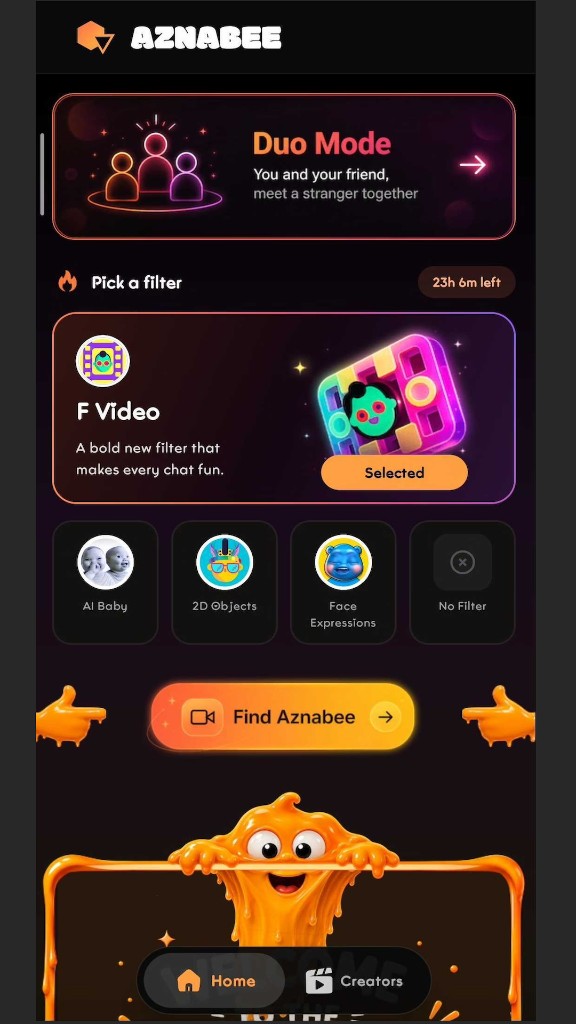
We've also tried to add a few things the original format never had. Duo Mode lets you bring a friend into the same chat session, so you're not meeting strangers completely alone, and there are AR filters if you'd rather not go in bare-faced. The whole thing runs directly in your browser over WebRTC, no downloads required. If you want the broader story of why we built it that way, about Aznabee has the fuller picture.
None of that changes the fundamental appeal, though. It's still just two cameras, a random match, and a skip button whenever you want one.
Ready to Try It Yourself
The best way to understand random video chat is honestly just to try a session or two - read this whole guide first if it helps you feel prepared, but don't overthink the actual moment you connect with someone. Head to Aznabee whenever you're ready, allow camera access, and see who you get matched with. Worst case, you click Next and try again in three seconds.